
How to stop taskbar icons from flashing in Windows 11
When an application needs your attention, Windows 11 will often make the icon in your taskbar flash with a bright orange color. While this is helpful for catching important alerts, it can be incredibly distracting when you’re trying to focus. Fortunately, you can turn this off with a single toggle in the Windows Settings app.
Disable taskbar icon flashing
- Right-click any empty space on your taskbar.
- Click Taskbar settings.
- Click Taskbar behaviors to expand the menu.
-
Uncheck the box labeled Show flashing on taskbar apps.
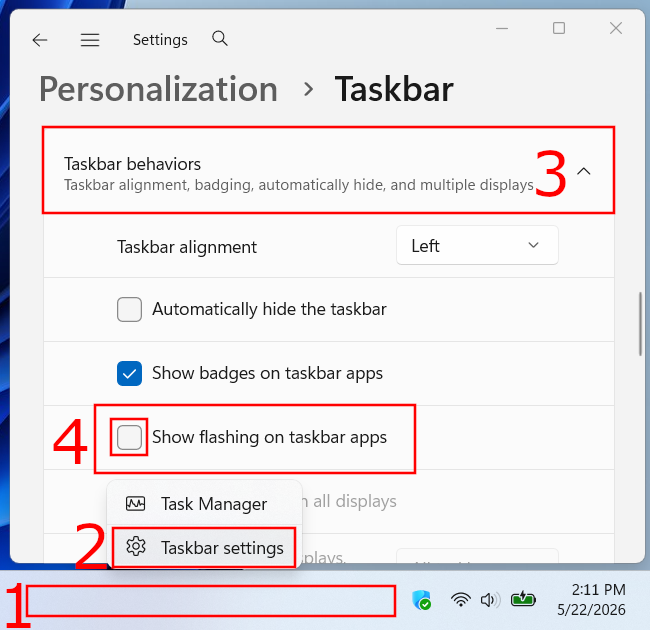
Once you uncheck that box, the change is instant. Applications will no longer blink or pulsate when they need your attention. Note that the icon will still highlight or show a badge (if badges are enabled) to let you know there is a notification, but the distracting flashing animation will be gone.
Related:
How to make the Windows 11 taskbar fully transparent
How to customize the Windows 11 taskbar (step-by-step guides)
How to fix missing or blank taskbar icons in Windows 10 & 11
How to automatically hide the taskbar in Windows 11 (and 10)
How to pin a folder to the taskbar in Windows 10 and 11
How to pin a batch file to Windows 10 or 11 taskbar or start menu