
How to disable Google Entertainment Space on an Android tablet
Learn how to quickly disable Google Entertainment Space and remove the left-swipe media screen from your Android tablet's home screen.
Google Entertainment Space is a built-in media hub on select Android tablets (like Lenovo and Google Pixel) that appears when you swipe right from your home screen. While you cannot completely uninstall it, you can easily disable the app and hide the swipe screen to keep your layout clean. Here is how to turn it off in just a few steps.
Quick answer: Go to Settings > Apps > See all apps, tap Entertainment Space, tap Disable, and then tap Disable app. Next, long-press an empty spot on your home screen, tap Home settings, and toggle off Entertainment Space.
How to disable Google Entertainment Space on an Android tablet
- Open Settings on your tablet.
- Tap Apps (or Apps & notifications).
- Tap See all apps.
- Tap Entertainment Space.
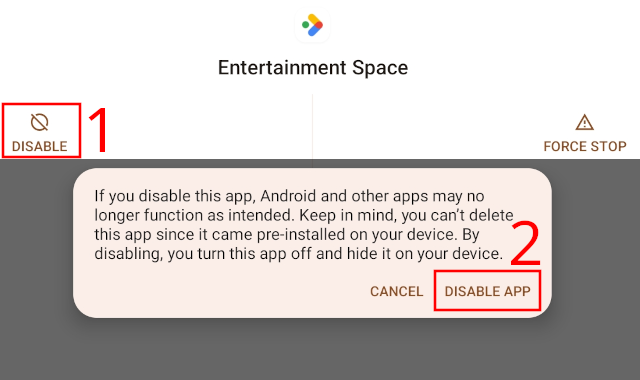
- Tap Disable.
-
Tap Disable app to confirm.
- Close Settings.
- Press and hold an empty area on your Home screen until a menu appears.
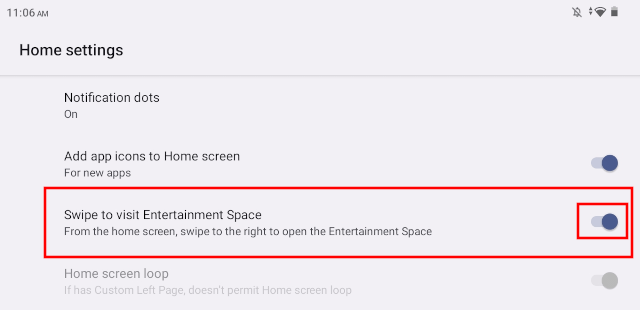
- Tap Home settings.
-
Tap Swipe to visit Entertainment Space (or the toggle next to it) to turn it off.
- Return to your home screen.
Troubleshooting & additional tips
How to re-enable Entertainment Space
If you ever want Entertainment Space back, return to Settings > Apps > See all apps > Entertainment Space and tap Enable. Then, long-press your home screen, open Home settings, and turn Entertainment Space back on.
What to do if the toggle is missing or greyed out
If the Entertainment Space toggle is greyed out or missing from your Home settings, your tablet launcher may be locked by the manufacturer. Installing a custom launcher like Nova Launcher will allow you to customize or remove swipe screens.
Entertainment Space vs. Google Discover
Disabling Entertainment Space will not turn off Google Discover (the Google News feed). Google Discover is managed separately inside the Google App settings under General > Discover.
Related:
How to disable Google Assistant on any Android phone or tablet
How to turn off Google News notifications on Android
How to turn off the news feed (Discover) in the Google app