
How to appear offline on the PS5 before signing in
This step-by-step tutorial will show you how to appear offline before signing in on the PlayStation 5.
Video ↓
Appearing offline on your PlayStation 5 before signing in can offer several benefits that enhance your gaming experience. Here are a few reasons why you might choose to do so:
- Focus on single-player games: Sometimes, you might want to immerse yourself in a single-player game without interruptions. By appearing offline, you can enjoy your game peacefully without friends inviting you to multiplayer sessions or sending messages.
- Avoid unwanted social interactions: Whether you need some alone time or want to avoid specific friends or acquaintances, appearing offline allows you to game without drawing attention to your online status. This helps you control your social interactions and ensures your gaming time remains your own.
- Maintain privacy: Appear offline to protect your privacy. This can be useful if you're playing a game you don't want others to know about or if you're testing out new games without showing your activity to your entire friends list.
- Avoid distractions: Notifications and invitations can be distracting, especially during intense gaming sessions. Appearing offline minimizes these distractions, allowing you to stay focused and fully engaged in your gameplay.
- Multiplayer strategy: In some cases, you might want to strategize with a select group of friends without others joining in. By appearing offline, you can coordinate with your chosen teammates without additional players noticing your presence.
In summary, appearing offline on your PlayStation 5 before signing in provides greater control over your gaming experience, privacy, and social interactions. It's a simple yet effective way to tailor your gaming sessions to your preferences and needs.
How to appear offline on the PS5 before logging in
-
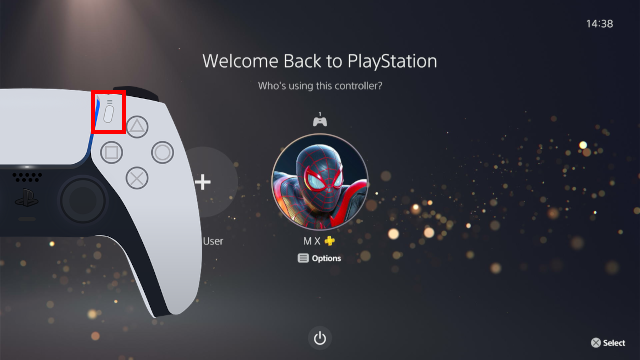
When you are on the login screen, press the options button on your controller.
-
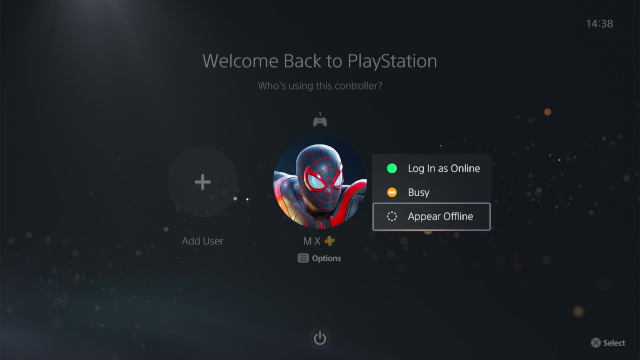
Select Appear offline.
-
Press the X button on your controller.
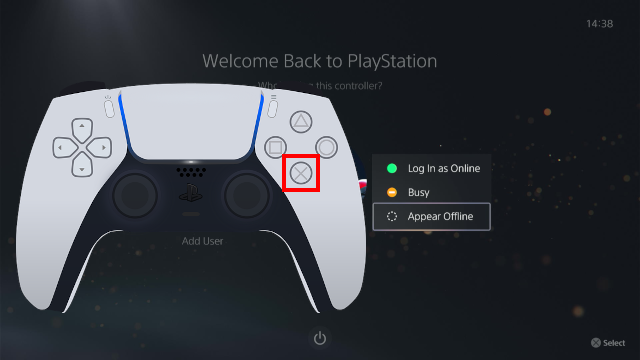
You will now appear offline when you log in to your PlayStation 5.

Related:
How to hide your online status on your PS5 (4 ways)
PS5 privacy settings (step-by-step guides)
How to hide games on your PS5 (step by step)
How to hide your gaming history on your PS5 (step by step)
How to hide your friends list on your PS5 (step by step)