
How to disable the Bixby button and change it to the power menu on Samsung
Is your Samsung Galaxy phone or Galaxy Tab launching Bixby every time you try to turn off your device? In this step-by-step guide, I will show you how to change the side button back to the traditional power menu on your Android device.
ADVERTISEMENT
How to change the Bixby button back to the power menu
- Open settings on your Samsung Galaxy.
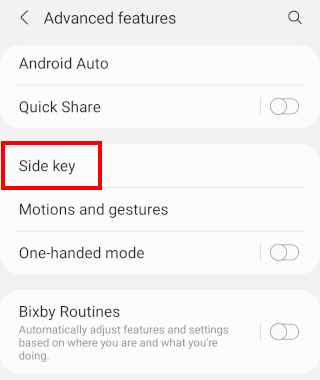
- Scroll down and tap on Advanced features.
-
Tap on Side key or Side button.
-
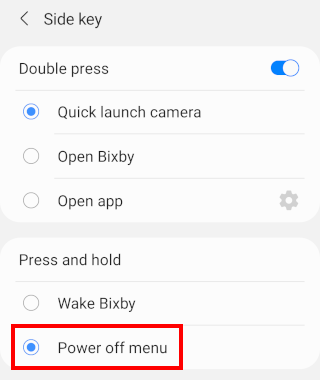
Select Power off menu at Press and hold.
- Close settings.
That's it! Now, when you press and hold the power button on your Samsung Galaxy phone or tablet, it will bring up the classic power menu (Power off, Restart, Lockdown) instead of launching Bixby.
ADVERTISEMENT
Related:
How to change Google Gemini button to power button on Pixel
How to disable Google Assistant on any Android phone or tablet