
How to mute or lower the PlayStation 5 startup beep sound
That startup beep has been the same since the PS3. It's not exactly loud, but if you're trying to slip in a quiet session without letting anyone else in the house know, it ruins the whole bit.
The PS5 lets you mute the startup beep sound or turn it down in settings. Here's how to do it in a few steps.
Note: This setting mutes the beep from the console's built-in speaker, not audio playing through your TV or headset. Turning it off makes your PS5 virtually silent when powering on or entering Rest Mode.
How to mute the PS5 startup beep or adjust its volume
- From the home screen, go to Settings (the gear icon in the top right).
- Open System.
- Select Beep and Light.
- To silence it completely: Turn on the Mute Beep Sound option.
- To just make it quieter: Select Volume and choose between High (Standard), Medium, or Low.
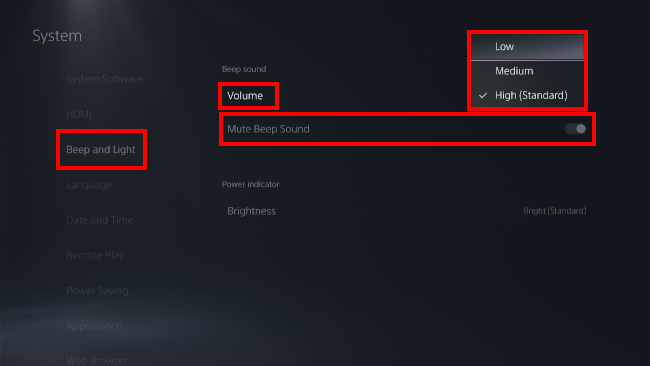
Tip: Setting the volume to "Low" keeps the beep quiet enough that it's barely noticeable without fully muting it. Good middle ground if you still want to know the console is on.
The "Remote play" exception
If you turn on your PS5 using Remote Play (via phone, PC, or PlayStation Portal), the console still beeps unless you've enabled the Mute Beep Sound toggle above. For a fully silent startup no matter how you power on, muting is the only option that covers all cases.
Related:
How to mute your PS5 controller microphone (3 ways)
References:
https://www.playstation.com/en-us/support/hardware/ps5-console-beep-sound/