
How to show seconds in the Windows 11 system tray clock
The Windows taskbar clock only shows hours and minutes by default. If you need precise time tracking, Windows 11 includes a native setting to display seconds directly in the system tray clock without installing third-party tools.
ADVERTISEMENT
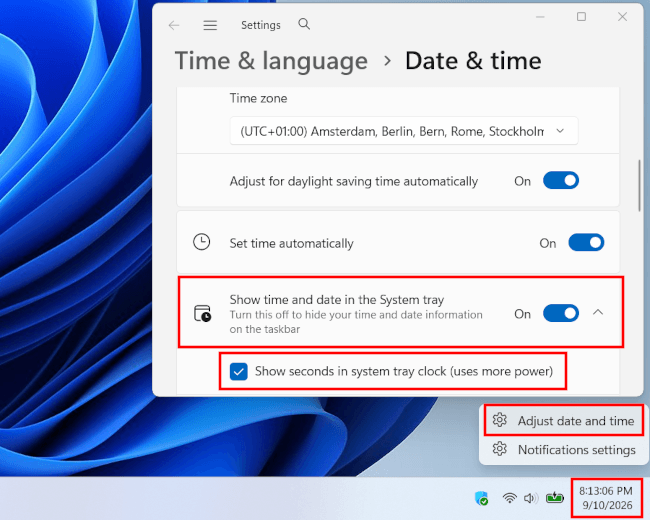
Quick tutorial: Right-click the clock and select Adjust date and time. Click Show time and date in the System tray and check the box next to Show seconds in system tray clock.
Method 1: Enable seconds in Windows 11 settings (easiest)
- Right-click the clock in the system tray.
- Click Adjust date and time.
- Click Show time and date in the System tray.
- Check the box next to the Show seconds in system tray clock option.
- Close settings.
ADVERTISEMENT
Method 2: Enable seconds via Registry Editor (if toggle is missing)
If the option is missing or greyed out in Settings, you can force Windows 11 to display seconds using the Registry Editor.
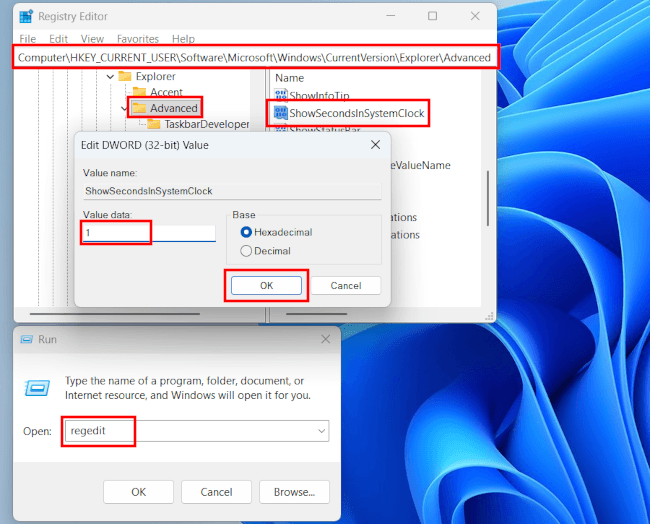
- Press the Windows + R keyboard keys to open the Run dialog.
- Type
regedit. - Press Enter or click OK.
- Navigate to:
HKEY_CURRENT_USER\Software\Microsoft\Windows\CurrentVersion\Explorer\Advanced - In the right pane, look for ShowSecondsInSystemClock:
- If it exists: Double-click it and change the Value data from 0 to 1.
- If it does not exist: Right-click an empty space in the right pane, select New > DWORD (32-bit) Value, name it ShowSecondsInSystemClock, and set its value to 1.
- Click OK.
- Restart File Explorer or log out and back in for the changes to take effect.
ADVERTISEMENT